
Kortek Audio
Pick your mic and speakers once. Kortek Audio keeps them as the Windows default and holds your mic volume, even when Discord, Zoom, games or a USB replug try to change them.
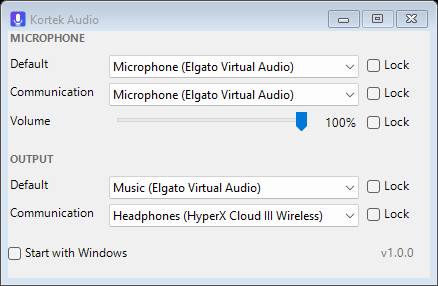
- Lock your microphoneSeparate locks for the Default and Communication input.
- Lock mic volumeApps that auto-adjust your mic get put back instantly.
- Lock your outputDefault and Communication speakers or headset stay put.
- Tiny and quietOne small exe, lives in the tray, updates itself in the background.
Run the download once: it installs itself for your user (no admin needed), starts with Windows and sits in the tray. Close the window and it keeps working.
Windows may say "Windows protected your PC" the first time because the app is new. Click More info → Run anyway.
Remove it any time from Settings → Apps → Kortek Audio.